Exporting Vinted sales for your accountant
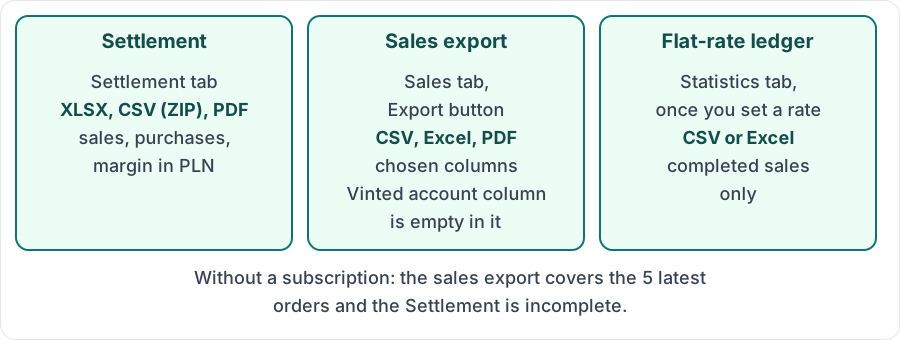
Vintlyze offers three exports you can hand to your accountant instead of screenshots: the settlement for a period (XLSX, CSV in a ZIP or PDF), the sales export from the "Sales" tab (CSV, Excel or PDF) and, if you set a rate, the revenue ledger for the flat-rate tax (CSV or Excel). The data reaches Vintlyze from your Vinted account through the Chrome extension.
Last verified:
The settlement: sales and purchases together
In the "Settlement" tab you choose a period (month, year or everything) and click XLSX, CSV or PDF. CSV is a ZIP with one file per tab. The file has sales, purchases and margin in PLN at NBP rates (table A), with dates, price, currency and the Vinted order ID. Steps: guide "How to download your Vinted monthly statement".
The sales export with chosen columns
The "Export" button in the "Sales" tab gives "CSV file", "Excel (.xlsx)" and "PDF document". It covers the whole history for the selected status and account (ignoring search and selection); "Export year" narrows it to one year.
Default columns: Item, Date, Amount, Status and Vinted account (empty in this export). In Settings, under "Export file columns", you can add and order, among others, dates (sale, completion, wallet credit), the Vinted order number, market, item link, and net amount and VAT. The "Date" column depends on the chosen date basis. Net amount and VAT are filled only if you enter a VAT rate; sale prices are then treated as gross.
CSV: semicolon and UTF-8 with a BOM, so Excel opens accented characters correctly.
Revenue ledger for the flat-rate tax
After you enter your rate in Settings ("Flat-rate tax"), the "Statistics" tab shows a "Revenue ledger (flat-rate tax)" card: per month and per currency, revenue, cumulative revenue and the flat-rate tax due at your rate, from completed sales only. Export: "Export CSV" or "Export Excel". It is a helper summary, not tax advice; agree the way you settle with your accountant.
Limits on an account without a subscription
Without a subscription the sales export covers the 5 latest orders, and the Settlement is incomplete (only the first 5 saved orders and the first 5 saved purchases reach Vintlyze). Full data requires a subscription.
Vintlyze
FAQ
- Which columns does the export have?
- By default Item, Date, Amount, Status and Vinted account. You can also turn on the sale, completion and wallet credit dates, the Vinted order number, market, item link, and net amount and VAT. The Settlement has its own set of columns, including prices in PLN and margin.
- Which format can I download?
- Sales export: CSV, Excel (.xlsx) or PDF. Settlement: XLSX, CSV (a ZIP archive) or PDF. Flat-rate ledger: CSV or Excel.
- Can I export my purchases?
- Yes. The "Purchases" tab has its own "Export" menu (CSV, Excel, PDF) and exports what you see after filters. Purchases are also in the Settlement, which sets them against sales.
- Does export work without a subscription?
- Only to a limited extent: the sales export covers the 5 latest orders and the Settlement is incomplete. Full data requires a subscription.