Vinted shipping label: how to download it with Vintlyze
In Vintlyze you download a shipping label from the "Sales" tab: for a sale where Vinted has generated a label you click the printer icon and the label opens in a new tab. This requires the Vintlyze Chrome extension to be installed and you to be logged in to Vinted in the same browser.
Last verified:
How to download a label, step by step
1. Sync your sales with the extension. A label exists only for sales where the Vinted conversation has an action to download or send the label and that have a shipment number saved during sync.
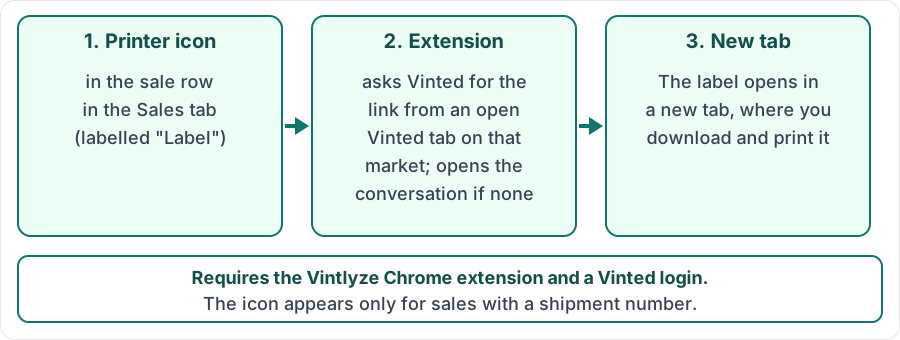
2. In the "Sales" tab click the printer icon ("Label") in the actions column, next to the conversation and item icons.
3. The extension asks Vinted for the link from an open Vinted tab on that order's market (opening one if there is none), and Vintlyze opens it in a new tab, where you download and print the label.
When something does not work
With no Vinted tab open for that market, the extension opens the conversation for the order, and Vintlyze asks you to click again once the page has loaded. Without the extension you will see a message to install it. When Vinted does not return the link (for example the session expired or the order state changed), an error appears; sync again or open the conversation on Vinted.
The icon is missing for sales without a saved shipment number (for example older records) until a sync fills it in.
Limits
Sales only, not purchases, one at a time (one click, one label). Vintlyze does not store labels or links; it asks Vinted when you click. It needs a browser with the Chrome extension where you are logged in to Vinted.
Vintlyze
FAQ
- Do I need the extension to download a label?
- Yes. The Vintlyze extension fetches the label from your logged-in Vinted tab, because the Vintlyze server has no access to your Vinted session.
- Why is there no printer icon on my sale?
- The icon appears only for sales with a label generated by Vinted and a saved shipment number. Sync your data with the extension and check again.
- What does the message about opening a Vinted tab mean?
- The extension found no open Vinted tab and opened a new one. Wait for it to load (log in if needed) and click the icon again.
- Can I download a label for a purchase?
- No. Downloading applies to sales only.