How to calculate profit from Vinted sales
Profit from a Vinted sale is the sale price minus the purchase cost, shipping and other costs, and margin is profit divided by the sale price, as a percentage. Enter your amounts in the calculator below to see both.
Last verified:
The formula for profit and margin
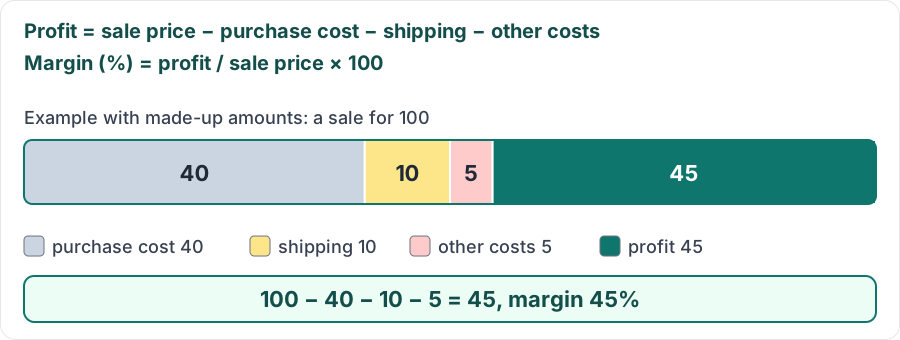
Profit = sale price − purchase cost − shipping − other costs. Margin (%) = profit / sale price × 100, so it is based on the sale price, not the purchase cost.
Example with made-up amounts: sale 100, purchase 40, shipping 10, packaging 5. Profit is 100 − 40 − 10 − 5 = 45 and margin is 45%. The calculator works the same way; it treats negative and invalid values as zero and shows no margin when the sale price is zero.
Which costs to include
Include what you spent on that sale: the purchase, shipping if you pay for it, packaging and promotion. The calculator does not work out Vinted fees because they may change (guide "Vinted fees: what sellers pay and what buyers pay"). Enter amounts in one currency; the calculator does not convert.
How this looks in Vintlyze
In the "Settlement" tab Vintlyze matches the sale and purchase of the same item, converts to PLN at NBP rates and shows margin as the difference between the prices. It does not include your shipping or packaging, so subtract them yourself (guide "How to download your Vinted monthly statement"). You can also enter the purchase price in the "Active" tab, in the "Purchase price" column.
Check your numbers
Profit: 0.00
Vintlyze
FAQ
- How is margin calculated?
- Margin is profit divided by the sale price, expressed as a percentage. With a sale of 100 and a profit of 45, margin is 45%.
- Does shipping count as a cost?
- Yes, if you paid for it as the seller, it reduces your profit. If the buyer pays for it, do not enter it in the calculator.
- Does the calculator include Vinted fees?
- No, we do not quote fee rates because they may change. If you bear any other cost related to the sale, enter it in the "Other costs" field.
- Where does Vintlyze get the purchase price from?
- For the Settlement, from your purchases synced from your Vinted account. For active listings you can also enter the purchase price by hand in the "Active" tab.